Welcome to Anupsagar.co.in – The Ultimate Hub for AI Photo Editing Anup Sagar Prompts in 2026
If you are looking for the best AI Photo Editing Anup Sagar prompts for Google Gemini and ChatGPT, you are in the right place. At Anupsagar.co.in, we provide the latest and most trending AI photo editing prompts that help you create professional, cinematic, and ultra-realistic images in just a few seconds. Whether you want gaming profile photos, Free Fire AI edits, cinematic portraits, festival edits, neon backgrounds, or 4K ultra-realistic images, our carefully crafted prompts make the editing process simple and powerful.
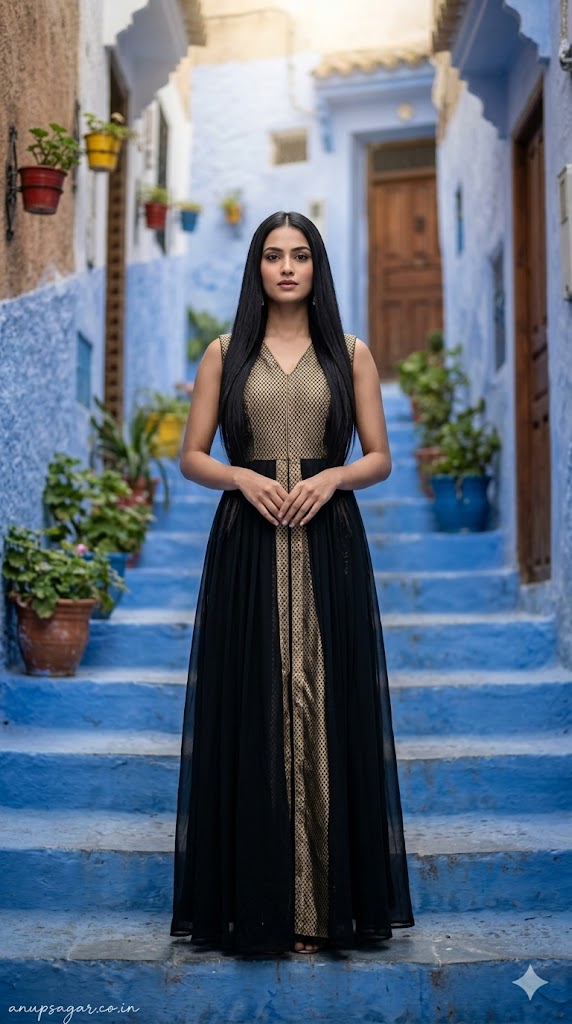
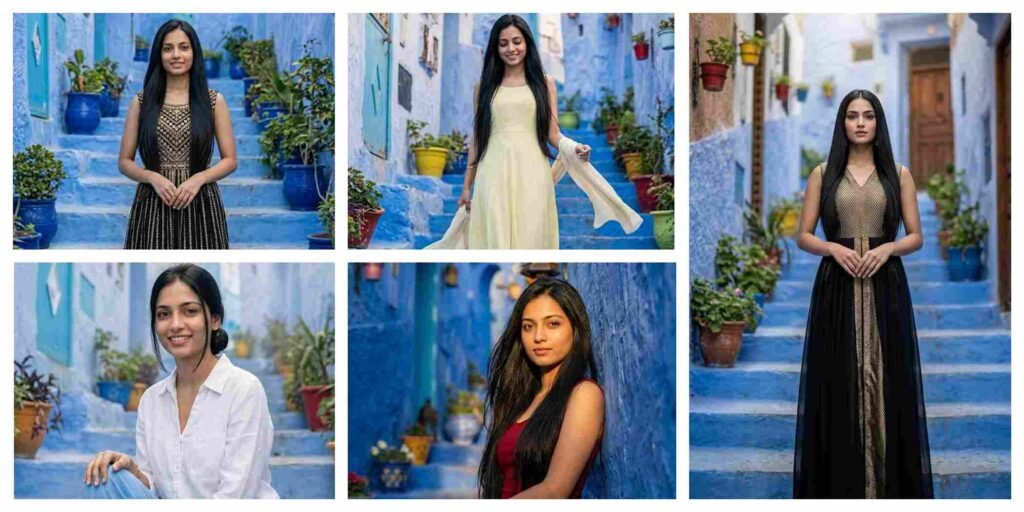
Create a full-body ultra-realistic cinematic portrait of a woman standing still at the center of the blue staircase in Chefchaouen. FACE LOCK — ZERO MODIFICATION POLICY FACE CLARITY — MAXIMUM SHARPNESS MODE POSE: • Standing upright • Hands gently clasped in front • Balanced symmetrical frame EXPRESSION: Calm, elegant neutral smile OUTFIT: • Black and gold modern fusion dress • Premium travel-luxury aesthetic HAIR: Sleek straight, perfectly arranged LIGHTING: Soft top light + subtle golden highlights BACKGROUND: Symmetrical blue stairs, pots, doors CAMERA: DSLR 85mm, ultra sharp face, depth separation STYLE: Luxury cinematic portrait, Instagram viral TEXT: “anupsagar.co.in” handwritten, ASPECT RATIO: 9:16
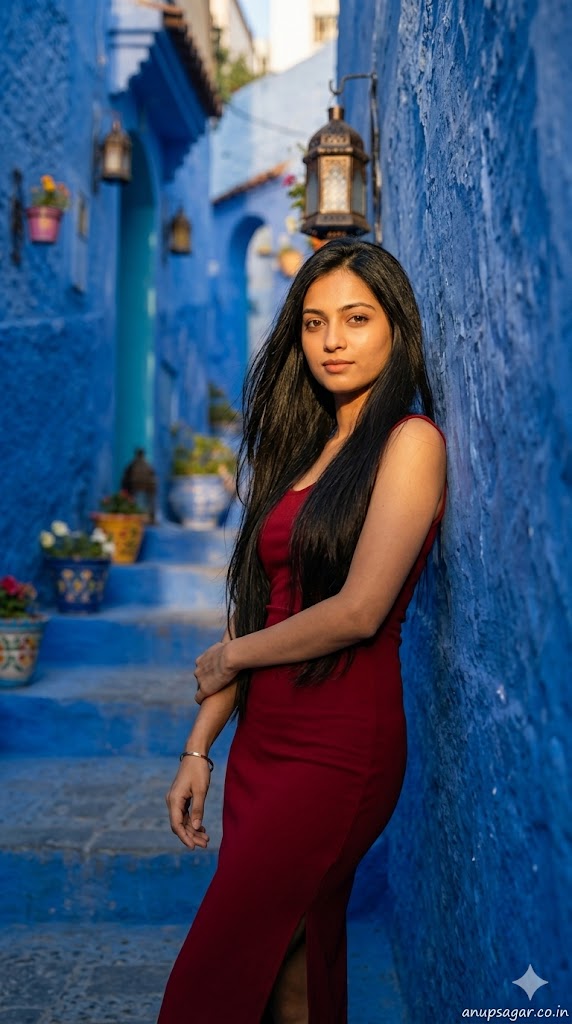
Create a full-body ultra-realistic cinematic portrait of a woman leaning against the blue wall beside the stairs in Chefchaouen. FACE LOCK — ZERO MODIFICATION POLICY FACE CLARITY — MAXIMUM SHARPNESS MODE POSE: • Leaning shoulder against wall • Arms crossed loosely • One leg slightly bent EXPRESSION: Confident, soft serious gaze OUTFIT: • Deep red fitted dress with slit • Elegant travel fashion look HAIR: Open, smooth, slightly wind-touched LIGHTING: Golden hour side lighting with dramatic shadows STYLE: Editorial + cinematic Instagram viral aesthetic BACKGROUND: Blue textured wall, lanterns, flower pots CAMERA: 85mm DSLR, shallow DOF, crisp face TEXT: “anupsagar.co.in” handwritten
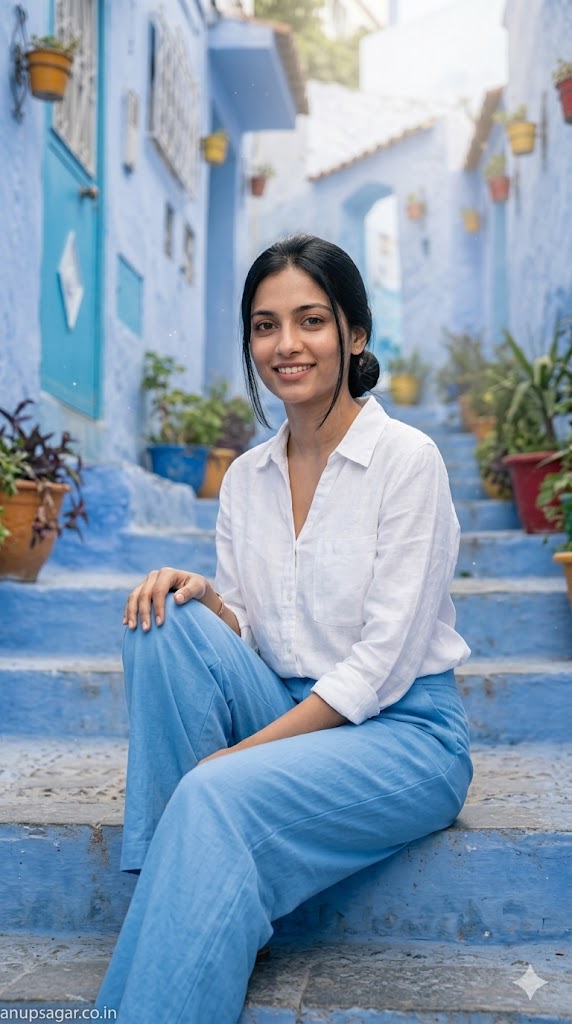
Create a full-body ultra-realistic cinematic portrait of a woman sitting casually on the iconic blue stairs of Chefchaouen. FACE LOCK — ZERO MODIFICATION POLICY (same as original) FACE CLARITY — MAXIMUM SHARPNESS MODE (same as original) ASPECT RATIO: 9:16 POSE: • Sitting sideways on stairs • One knee bent, one leg extended • One hand resting on knee EXPRESSION: Gentle smile, direct eye contact OUTFIT: • White linen shirt + sky blue wide-leg pants • Minimalist travel aesthetic HAIR: Neatly tied low bun with soft strands LIGHTING: Soft diffused daylight with subtle glow BACKGROUND: Moroccan doors, plants, soft blur CAMERA: DSLR 85mm, face priority sharp focus EXTRA EFFECTS: Light dust particles, soft cinematic haze TEXT: Signature bottom-left
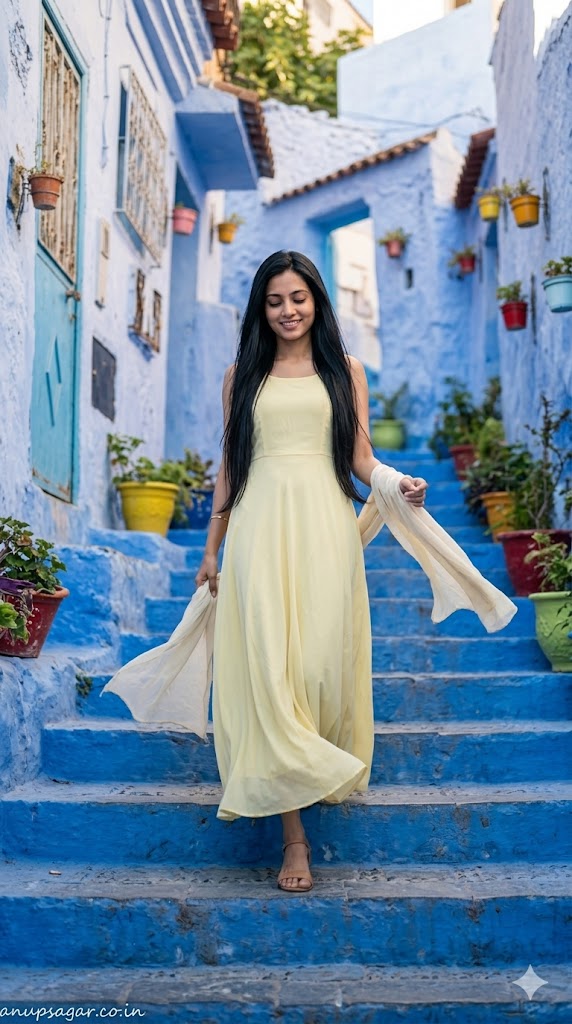
Create a full-body ultra-realistic cinematic travel portrait of a graceful woman walking slowly down the blue stairs of Chefchaouen, Morocco, captured mid-step with natural motion. FACE LOCK — ZERO MODIFICATION POLICY: Use the uploaded reference image for the woman’s face. Face must remain 100% identical. No change, no reshaping, no beautification. Maintain exact identity. FACE CLARITY — MAXIMUM SHARPNESS MODE: Face must be extremely sharp, ultra-HD, highly detailed with natural skin texture, visible pores, crisp edges. ASPECT RATIO: 9:16 vertical STYLE: Ultra-realistic DSLR travel photography, cinematic lighting, 8K detail SCENE: Blue staircase street of Chefchaouen with textured steps, flower pots, rustic doors POSE: • Walking mid-stairs • One foot slightly ahead, natural step • One hand holding a light scarf flowing EXPRESSION: Calm soft smile, looking slightly downward OUTFIT: • Flowing light pastel yellow maxi dress • Soft fabric movement HAIR: Slight wind-blown natural flow LIGHTING: Golden hour glow, warm highlights, soft shadows BACKGROUND: Slight blur with depth, face perfectly sharp CAMERA: DSLR 85mm, shallow depth, focus locked on face NEGATIVE PROMPT: face blur, distortion, CGI look TEXT: “anupsagar.co.in” handwritten bottom-left
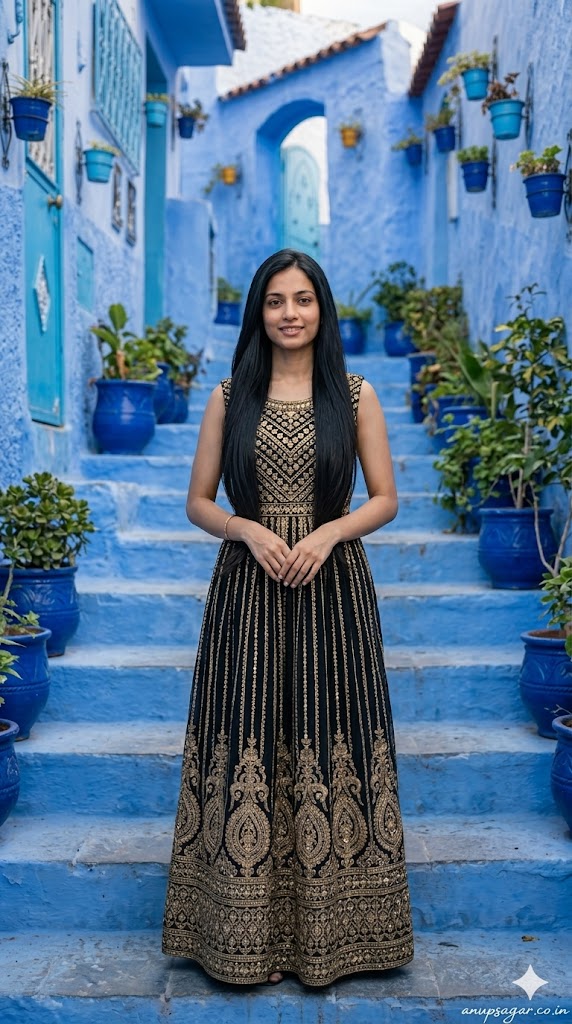
Create a full-body ultra-realistic cinematic portrait of a woman standing still at the center of the blue staircase in Chefchaouen. FACE LOCK — ZERO MODIFICATION POLICY FACE CLARITY — MAXIMUM SHARPNESS MODE POSE: • Standing upright • Hands gently clasped in front • Balanced symmetrical frame EXPRESSION: Calm, elegant neutral smile OUTFIT: • Black and gold modern fusion dress • Premium travel-luxury aesthetic HAIR: Sleek straight, perfectly arranged LIGHTING: Soft top light + subtle golden highlights BACKGROUND: Symmetrical blue stairs, pots, doors CAMERA: DSLR 85mm, ultra sharp face, depth separation STYLE: Luxury cinematic portrait, Instagram viral TEXT: “anupsagar.co.in” handwritten
With the rapid growth of AI tools like Google Gemini and ChatGPT, AI Photo Editing Anup Sagar techniques have become more powerful than ever. Creating stunning AI-generated photos is now easier, but the real secret behind high-quality results is using the right prompts. That’s why Anupsagar.co.in focuses on sharing step-by-step guides, detailed prompts, and trending ideas for AI Photo Editing Anup Sagar users.
On this website, you will discover high-quality prompts for portraits, gaming profiles, festival photos, Instagram-style edits, cinematic photography, and viral trending AI images. All prompts are specially designed for AI Photo Editing Anup Sagar workflows using Gemini and ChatGPT tools, ensuring sharp details, realistic lighting, and professional-quality outputs.
If you want to stay ahead in the world of AI photo editing trends in 2026, bookmark Anupsagar.co.in and explore our regularly updated collection of powerful AI prompts, editing tutorials, and creative ideas that help you transform simple photos into stunning AI masterpieces.
How To Use AI Photo Editing Prompts on Gemini and ChatGPT
Using AI Photo Editing Anup Sagar prompts on Gemini and ChatGPT is very simple. Just copy the prompt, upload your image (if needed), and generate stunning visuals within seconds. These prompts are perfect for creating cinematic portraits, travel photography, village scenes, and professional profile images with ease.
Step 1: Open Gemini or ChatGPT
First, open the Google Gemini AI tool or ChatGPT in your browser or mobile app. Make sure you are logged in with your Google or OpenAI account so you can use the image generation feature without any issues.
Step 2: Upload Your Photo (Optional)
If the prompt requires your face or a reference image, upload your photo first. Most AI photo editing prompts work best when you provide a clear image so the AI can generate a realistic result.
Step 3: Copy the AI Prompt
Now go back to this article and copy any prompt you like. We have shared prompts for different styles such as cinematic portraits, travel photography, mountain views, village lifestyle photos, and professional photoshoot images.
Step 4: Paste the Prompt
Paste the prompt inside Gemini or ChatGPT and make sure the instructions remain the same. If the prompt includes a line like “Use uploaded image as face reference”, keep it unchanged so the AI understands the request correctly.
Step 5: Generate the Image
After pasting the prompt, simply click Generate. Within a few seconds, the AI will create a high-quality edited image with realistic lighting, cinematic colors, and professional details.
Step 6: Download and Share
Once the image is generated, you can download the photo and use it for Instagram posts, gaming profiles, social media content, or personal projects.
Using these prompts on Gemini and ChatGPT allows anyone to create stunning AI photos without advanced editing skills. Just copy the prompt, upload your photo, and let the AI generate beautiful cinematic, travel, mountain, or professional-style images in seconds.
For more trending AI photo editing prompts in 2026, keep visiting Anupsagar.co.in where we regularly share the latest and most powerful prompts for creators and editors. ????
Benefits of AI Prompts for Photo Editing
AI prompts have completely transformed the way people create and edit images. With tools like Google Gemini and ChatGPT, anyone can generate professional-quality photos simply by using the right prompt. Instead of spending hours editing manually, AI prompts allow creators to produce stunning visuals in just a few seconds. Here are some of the main benefits of using AI prompts for photo editing.
1. Fast and Time-Saving Editing
One of the biggest advantages of AI photo editing prompts is speed. Traditional editing can take a long time, but with AI prompts, you can create cinematic portraits, travel photos, mountain landscapes, and professional profile images instantly.
2. No Professional Skills Required
You don’t need advanced editing knowledge to create amazing images. Even beginners can use AI prompts to generate high-quality photos with realistic lighting, detailed backgrounds, and creative styles.
3. High-Quality and Realistic Results
AI tools are designed to produce ultra-realistic images with professional lighting and sharp details. With the right prompt, you can create 4K cinematic photos, stylish portraits, and stunning nature scenes easily.
4. Endless Creative Possibilities
AI prompts allow you to experiment with different styles such as cinematic portraits, village lifestyle photos, travel photography, mountain views, neon gaming edits, and professional photoshoots. This gives creators unlimited opportunities to explore new ideas.
5. Perfect for Social Media and Profiles
AI-generated photos look unique and attractive, which makes them perfect for Instagram posts, gaming profiles, YouTube thumbnails, and personal branding.
6. Consistent and Professional Look
Using well-written prompts helps maintain a consistent style and quality in your photos. This is especially useful for content creators who want their images to look professional across all platforms.
Using AI prompts for photo editing is one of the easiest ways to create beautiful, high-quality images without complicated software. With platforms like Gemini and ChatGPT, anyone can transform a simple photo into a cinematic masterpiece in just a few seconds.
Final Words
AI photo editing is evolving rapidly, and AI Photo Editing Anup Sagar is becoming one of the most searched trends in 2026. In this article, we shared powerful prompts to help you create cinematic portraits, travel photos, mountain landscapes, village scenes, and professional edits easily.
At Anupsagar.co.in, our mission is to provide the best AI Photo Editing Anup Sagar prompts, tutorials, and creative ideas so that beginners and professionals can generate unique and high-quality images quickly.
If you found this article helpful, bookmark Anupsagar.co.in for more AI Photo Editing Anup Sagar prompts, trending edits, and creative inspiration.
Start using these prompts today and create stunning AI images that stand out. ✨
Start experimenting with these prompts today and create stunning AI photos that stand out from the crowd. ✨