Photo editing has evolved a lot over the years. Earlier, editors spent hours adjusting colors, fixing lighting, and removing unwanted objects manually. But in 2026, artificial intelligence has completely changed the game. Now, many edits can be done in seconds with just a click.
So the big question is:
???? Should you use AI photo enhancement or traditional manual editing?
Let’s compare both methods in a simple, beginner-friendly way.
???? 1. What is Manual Photo Editing?
Manual photo editing is the traditional method where a person edits images using software like Adobe Photoshop or Lightroom by adjusting everything step by step.
???? Description:
In manual editing, the user controls every detail of the image—brightness, contrast, color balance, shadows, sharpness, and more. It requires skill, patience, and experience.
???? How it works:
- Open image in editing software
- Adjust lighting and colors manually
- Use tools like brush, clone, and layers
- Fine-tune every detail
- Export final image
⭐ Pros of Manual Editing:
- Full creative control over every detail
- High-quality professional results
- Perfect for commercial and studio work
- No AI mistakes or random changes
- Ideal for branding consistency
❌ Cons of Manual Editing:
- Time-consuming process
- Requires skill and training
- Not beginner-friendly
- Can be stressful for large projects
???? 2. What is AI Photo Enhancement?
AI photo enhancement uses artificial intelligence tools like Remini or AI features in Canva to automatically improve images without manual effort.
???? Description:
AI photo enhancement analyzes an image and automatically fixes issues like blur, poor lighting, low resolution, and missing details. It uses smart algorithms trained on millions of images.
???? How it works:
- Upload image
- AI scans the photo
- Automatically enhances quality
- Fixes lighting, sharpness, and details
- Produces final improved image
⭐ Pros of AI Editing:
- Extremely fast (seconds to edit)
- Beginner-friendly (no skills required)
- Great for fixing blurry or old photos
- One-click enhancement tools
- Perfect for social media content
❌ Cons of AI Editing:
- Less control over details
- Sometimes over-edits faces or textures
- Results may look unnatural in some cases
- Limited customization compared to manual editing
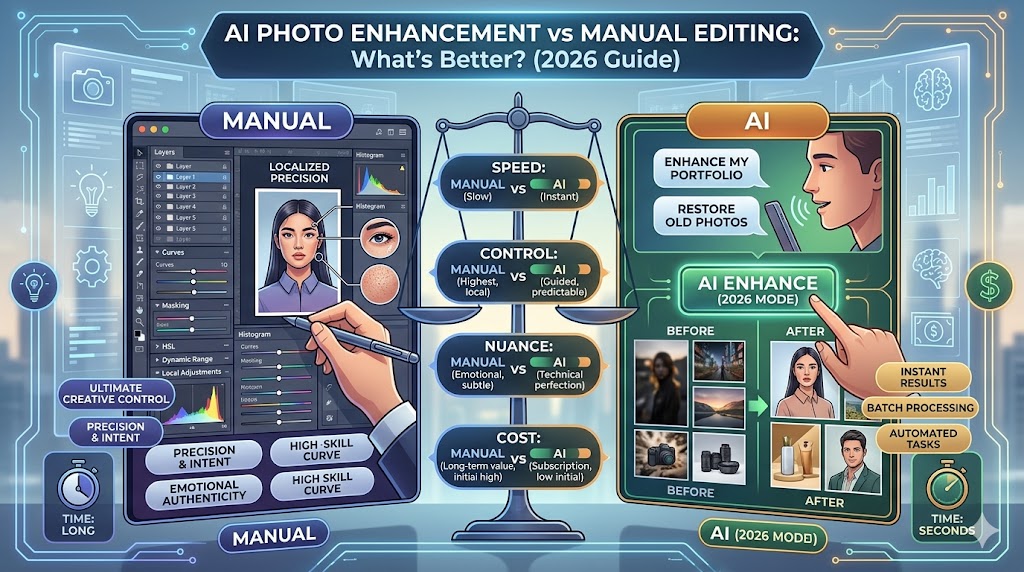
???? 3. AI Photo Enhancement vs Manual Editing (Full Comparison)
| Feature | Manual Editing | AI Photo Enhancement |
|---|---|---|
| Speed | Slow | Very fast |
| Skill Required | High | None |
| Control | Full control | Limited control |
| Quality | Professional & precise | High but sometimes artificial |
| Best For | Designers & professionals | Beginners & creators |
| Learning Curve | Difficult | Very easy |
| Creativity | Unlimited | AI-assisted |
⚡ 4. Which One Gives Better Results?
There is no single winner—it depends on your goal.
???? Choose Manual Editing if:
- You are a professional designer or photographer
- You need full creative control
- You are working on branding or commercial projects
- You want pixel-perfect accuracy
???? Manual editing is still the gold standard for professional work.
???? Choose AI Photo Enhancement if:
- You are a beginner
- You want fast results
- You are editing social media photos
- You need quick fixes for blurry or old images
???? AI is perfect for speed and convenience.
???? 5. Best Strategy (2026 Approach)
The smartest creators in 2026 don’t choose just one—they combine both.
???? Hybrid Editing Method:
- Use AI tools for quick enhancement
- Then use manual editing for fine adjustments
Example workflow:
- Enhance image using AI tool
- Import into Photoshop for final touch-ups
- Export high-quality final version
This gives you:
✔ Speed of AI
✔ Precision of manual editing
✔ Professional-level results
???? Final Thoughts
AI photo editing has made content creation easier than ever, but manual editing is still very important for professionals.
- AI = Fast, easy, beginner-friendly
- Manual = Powerful, precise, professional
???? The future is not “AI vs manual”—it is AI + manual working together.
If you are just starting out, begin with AI tools. As you grow, slowly learn manual editing for better control and creativity.